
















Category Match
Category Match - Play Online
Sort cute memoji cards into matching groups. Every tap counts, every slot matters, and one wrong move blocks the whole board. Clean vector art meets tactical card placement—no downloads, instant browser action across desktop, iOS, and Android.
How to Play Category Match
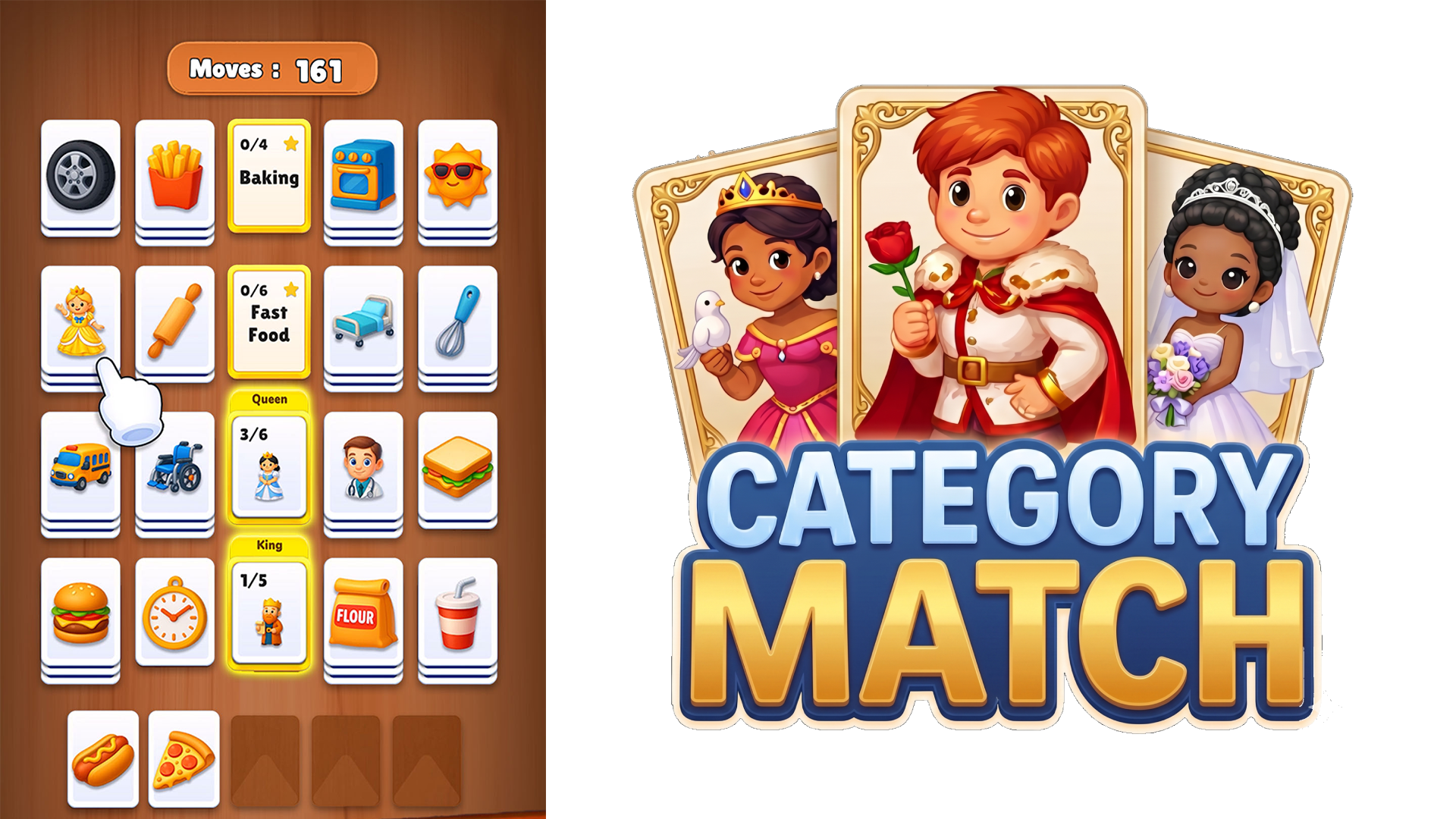
Clear the board by grouping memoji cards into their correct categories. Tap a card, drag it to the matching category slot at the top, and watch the stack fill. Limited space forces you to plan ahead—bad placement locks you out of future moves.
Tap, Drag, Sort
Examine each memoji's style and theme. Birthday hats cluster with cake icons, flowers group with fairies, security badges match jeeps. Tap any card on the board, swipe it to an empty category slot, and build complete sets. Once a category fills, it clears and frees up space. Run out of slots mid-level? Reset your approach or rethink card order. The puzzle games community calls this the "stack management grind"—every card placement ripples through the rest of the board.
Level Progression and Difficulty Ramp
Early stages hand you three categories and plenty of breathing room. By level five, the board floods with overlapping themes—hairbrushes, fairies, flowers—and your move counter shrinks. More categories appear, slot capacity tightens, and card arrangements twist into nested puzzles. Each cleared level unlocks the next challenge with fresh memoji sets and tougher category combinations. Word Associations Solitaire fans will recognize the escalating logic pressure and strategic card sequencing.
Observation and Tactical Clearing
Scan the board before your first move. Identify which cards share categories, count how many slots you need, and map your clearing sequence. Place high-priority categories first to avoid bottlenecks. If a fairy card sits under three birthday icons, clear the birthday stack early or risk blocking access. Wrong order? The board stalls. Hint and undo buttons offer quick fixes, but smart observation beats brute force. Players migrating from Word Solitaire already know this drill—category recognition replaces word meaning, but the tactical core stays identical.
Key Features
- Category-Based Card Matching: Group memoji cards by theme—birthday items, flowers, security gear—using observation and logic.
- Bright Vector Visuals: High-contrast blue and gold UI over wood-texture backgrounds with clean 2D clipart-style cards.
- Move Counter and Limited Slots: Every level restricts your moves and available space, forcing deliberate card placement.
- Progressive Difficulty Levels: Start with three categories and expand into complex multi-theme boards with nested card arrangements.
Who is Category Match for?
Casual players hunting short brain-teasing sessions, 35+ audiences craving low-stakes logic challenges, and fans of sorting, matching, and card-based logic games. If you burned through The Mystery of Jewels: Adventure - Match 3 or Magic Circus - Match 3, this delivers the same mobile-optimized Unity structure with observation-focused gameplay instead of gem-swapping.
Developer
Category Match was developed by Drivix Games. The game runs smoothly on desktop, iOS, and Android browsers with no download required, delivering tactical memoji sorting and category-based puzzle mechanics in a lightweight Unity build.
Controls
- Tap/Click card: Select a memoji from the board
- Drag to category slot: Move the card into the matching group at the top
- Hint button: Reveals one correct card-to-category match
- Undo button: Reverses your last card placement
FAQ
How do I beat a level with no empty slots left?
Plan your card sequence before placing anything. Clear high-priority categories first to free slots, then tackle nested cards blocking other groups. Use the undo button to backtrack if you lock the board.
What happens when I complete a category?
Once you fill all slots for a category, the cards vanish and the category bar clears. This frees up space for new cards and opens tactical options for clearing the remaining board.
Can I play Category Match on mobile devices?
Yes. Category Match runs in any modern browser on iOS, Android, and desktop. No installation or app store download—just click and play from Playgama.
How does the move counter affect gameplay?
Each level limits your total moves. Place a card incorrectly and you waste a move, pushing you closer to failure. Strategic planning and careful observation maximize your move efficiency and keep you in the game.
What makes Category Match different from other matching games?
Instead of swapping or flipping tiles, you manually sort memoji cards into thematic categories using limited slots and moves. The vertical category-matching twist adds spatial puzzle pressure on top of pattern recognition, separating it from standard tile-clearing mechanics in cards games.
Use this link to embed the game on your website using an iframe
 Sign in to Embed and Monetize Games
 Melon Sandbox
 PVZ Fusion Cheats
 Obby but You're on a Bike
 Idol Livestream: Doll Dress Up
 Hidden Object: Street Of Secrets
 Hazmob FPS: Online Shooter

 My Town Home: Family Playhouse
 Geometry Arrow 2
 Playground Man! Ragdoll Show!
 Piece of Cake: Merge & Bake
 Robby: The Speed Maze